
在VsCode中优雅的编写Vue
1.删除插件
Linux
code --list-extensions | xargs -n 1 code --uninstall-extensionWindows
code --list-extensions | % { code --uninstall-extension $_ }2.安装插件
插件列表:
导出插件列表命令
code --list-extensionsamayakite.aya-vue3-extension-pack
antfu.iconify
be5invis.vscode-custom-css
christian-kohler.npm-intellisense
christian-kohler.path-intellisense
davidanson.vscode-markdownlint
dbaeumer.vscode-eslint
docker.docker
donjayamanne.githistory
donjayamanne.python-extension-pack
dustypomerleau.rust-syntax
eamodio.gitlens
editorconfig.editorconfig
esbenp.prettier-vscode
eugenejeon.codesnap-plus-fix
fill-labs.dependi
formulahendry.auto-close-tag
formulahendry.auto-rename-tag
github.copilot
github.copilot-chat
github.vscode-github-actions
hollowtree.vue-snippets
jbockle.jbockle-format-files
jripouteau.adonis-vscode-extension
kevinrose.vsc-python-indent
kisstkondoros.vscode-gutter-preview
lokalise.i18n-ally
marscode.marscode-extension
mechatroner.rainbow-csv
meganrogge.template-string-converter
mikestead.dotenv
misodee.vscode-nbt
ms-azuretools.vscode-containers
ms-azuretools.vscode-docker
ms-ceintl.vscode-language-pack-zh-hans
ms-python.black-formatter
ms-python.debugpy
ms-python.python
ms-python.vscode-pylance
ms-python.vscode-python-envs
ms-vscode-remote.remote-ssh
ms-vscode-remote.remote-ssh-edit
ms-vscode.remote-explorer
ms-vsliveshare.vsliveshare
noxussj.element-plus
oderwat.indent-rainbow
oven.bun-vscode
pkief.material-icon-theme
pranaygp.vscode-css-peek
prisma.prisma
qwtel.sqlite-viewer
redhat.vscode-xml
redhat.vscode-yaml
ritwickdey.liveserver
rust-lang.rust-analyzer
scansio.auto-close-empty-tag
steoates.autoimport
sumneko.lua
syler.sass-indented
tamasfe.even-better-toml
tauri-apps.tauri-vscode
usernamehw.errorlens
vue.volar
william-voyek.vscode-nginx
xabikos.javascriptsnippets
yoavbls.pretty-ts-errors
yzhang.markdown-all-in-one
zerotaskx.rust-extension-pack
zhuangtongfa.material-theme保存为 extensions.txt 后打开终端执行即可
linux
xargs -n 1 code --install-extension < extensions.txt
windows
Get-Content extensions.txt | ForEach-Object { code --install-extension $_ }
3.配置 settings.json 信息
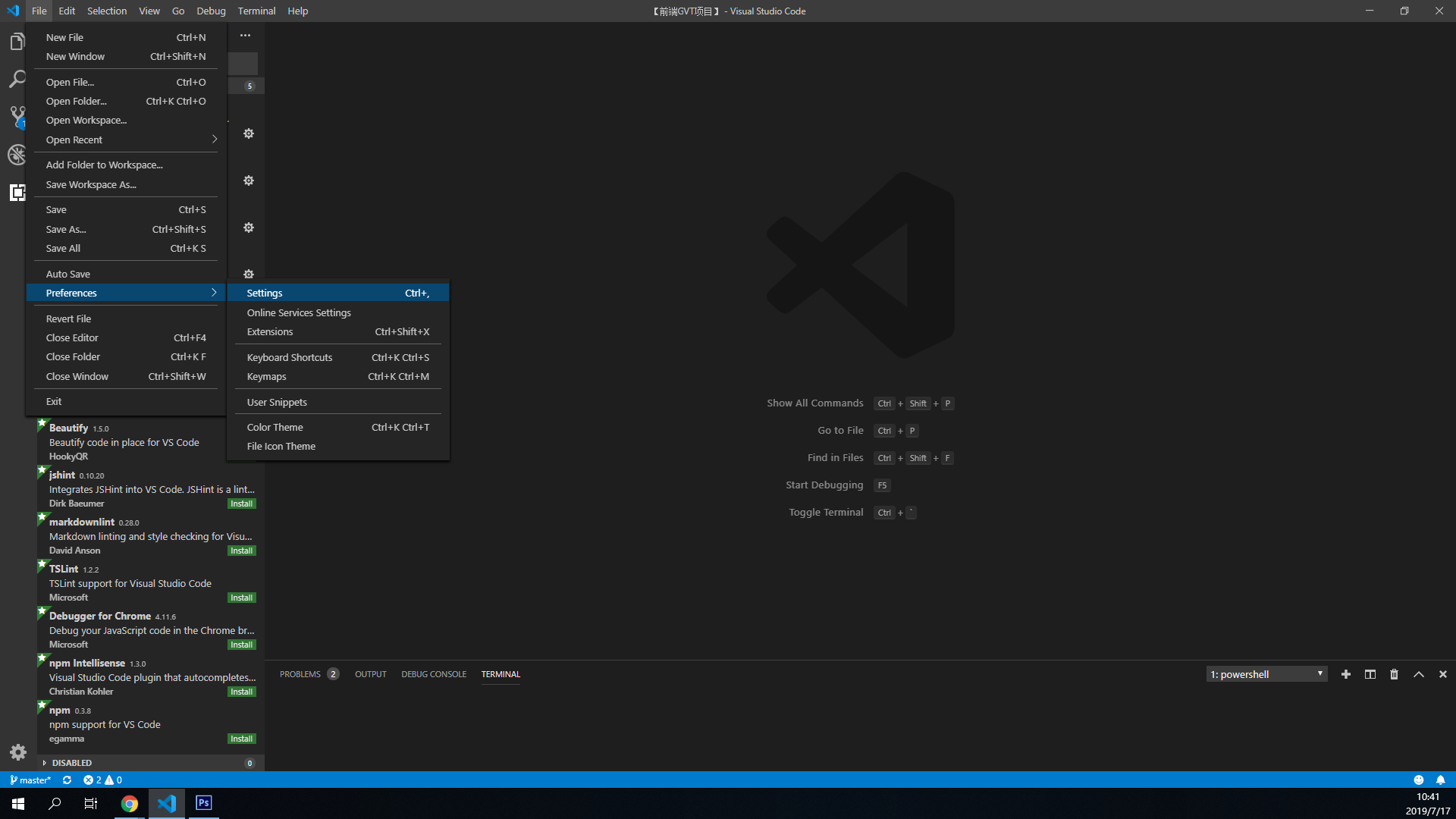
File->Preference->Settings
 现在看到的是界面配置模式,点击右上角的大括号 ( 如下图 ),可以打开
 settings.json 文件.
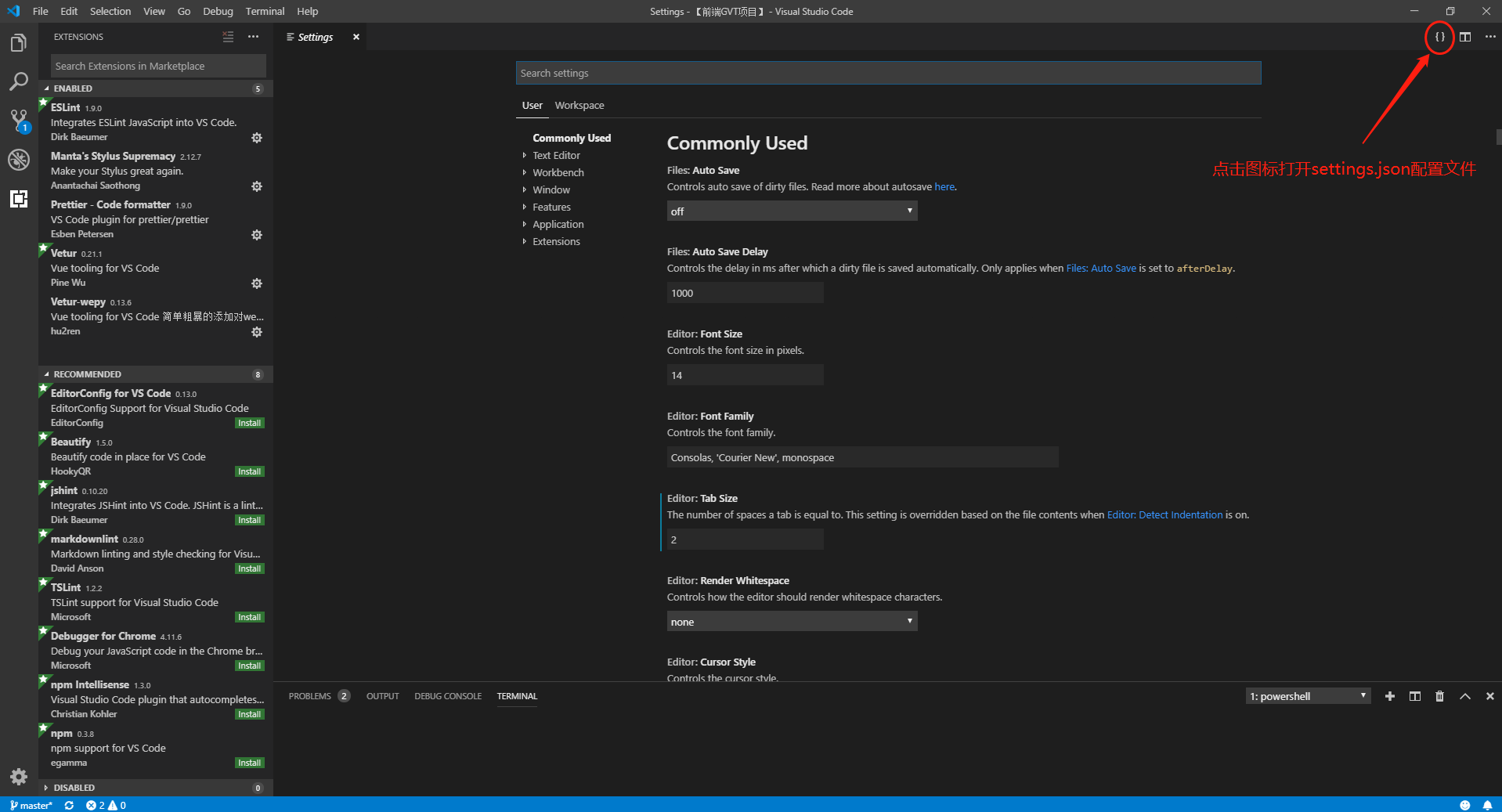 粘贴以下代码 ( 可以自行修改 ) ,保存即可
代码:
{
  // 控制是否启用平滑插入动画
  "editor.cursorSmoothCaretAnimation": "on",
  // 搜索控件添加额外的空白
  "editor.find.addExtraSpaceOnTop": false,
  // 控制编辑器是否应呈现垂直字形边距。字形边距最常用于调试。
  "editor.glyphMargin": true,
  // 控制是否在编辑器中自动显示内联建议。
  "editor.inlineSuggest.enabled": true,
  // 关闭自动设置tabsize
  "editor.detectIndentation": false,
  // 重新设定tabsize
  "editor.tabSize": 2,
  // 设置字体大小
  "editor.fontSize": 16,
  // 每次保存的时候自动格式化;
  "editor.formatOnSave": true,
  // 每次保存的时候将代码按eslint格式进行修复
  "editor.codeActionsOnSave": {
    "source.fixAll.eslint": "always"
  },
  // 关闭缩略图
  "editor.minimap.enabled": false,
  // 启用链接编辑
  "editor.linkedEditing": true,
  // 循环参数提示
  "editor.parameterHints.cycle": true,
  // 启用参数提示
  "editor.parameterHints.enabled": true,

  // 默认启用prettier
  "editor.defaultFormatter": "esbenp.prettier-vscode",
  "[python]": {
    "editor.defaultFormatter": "ms-python.black-formatter"
  },
  "[rust]": {
    "editor.defaultFormatter": "rust-lang.rust-analyzer"
  },
  "[xml]": {
    "editor.defaultFormatter": "redhat.vscode-xml"
  },
  "[yaml]": {
    "editor.defaultFormatter": "redhat.vscode-yaml"
  },

  // python 语言服务器
  "python.languageServer": "Pylance",

  // 图标主题
  "workbench.iconTheme": "material-icon-theme",
  // 编辑器颜色主题
  "workbench.colorTheme": "One Dark Pro Darker",
  // 编辑器默认界面
  "workbench.startupEditor": "none",

  // 修改默认终端为 msys2
  // "terminal.integrated.defaultProfile.windows": "MSYS2 UCRT",
  // "terminal.integrated.profiles.windows": {
  //   "MSYS2 UCRT": {
  //     "path": "cmd.exe",
  //     "args": ["/c", "C:\\msys64\\msys2_shell.cmd -defterm -here -no-start -ucrt64"]
  //   }
  // },
  // 终端默认颜色
  "terminal.integrated.tabs.defaultColor": "terminal.ansiBlue",
  // 终端滚动平滑
  "terminal.integrated.smoothScrolling": true,
  // 选择即复制
  "terminal.integrated.copyOnSelection": true,
  // 终端字体
  // "terminal.integrated.fontFamily": "'MesloLGS NF', Consolas, 'Courier New', monospace",
  // 光标样式
  "terminal.integrated.cursorStyle": "line",
  // 光标闪烁
  "terminal.integrated.cursorBlinking": true,

  // 自动更新
  "git.autofetch": true,
  // 启用智能提交
  "git.enableSmartCommit": true,
  // 总是在父文件夹中打开Git仓库
  "git.openRepositoryInParentFolders": "always",
  // Git忽略rebase警告
  "git.ignoreRebaseWarning": true,
  // 关闭提交警告
  "git.confirmSync": false,
  // 自动将本地标记替换为远程标记
  "git.replaceTagsWhenPull": true,

  // js/ts导入语句结尾设置
  "javascript.preferences.importModuleSpecifierEnding": "js",
  "javascript.suggest.paths": true,
  "typescript.preferences.importModuleSpecifierEnding": "js",
  "typescript.suggest.paths": true,
  "typescript.preferences.preferTypeOnlyAutoImports": true,
  "typescript.tsserver.maxTsServerMemory": 4096,
  "typescript.updateImportsOnFileMove.enabled": "always",

  // 失去焦点自动保存
  "files.autoSave": "onFocusChange",
  // 文件换行符设置
  "files.eol": "\r\n",
  // 指定文件类型 防止 css 被识别成 less/scss
  "files.associations": {
    "*.css": "css"
  },

  // 命令中心
  "window.commandCenter": false,

  // 信任所有文件
  "security.workspace.trust.untrustedFiles": "open",

  // 代理设置
  // "http.proxy": "http://127.0.0.1:7890",

  // eslint 配置
  "eslint.enable": true,
  "eslint.probe": ["javascript", "javascriptreact", "typescript", "typescriptreact", "html", "vue"],

  // prettier配置
  "prettier.enable": true,
  "prettier.printWidth": 100,
  "prettier.tabWidth": 2,
  "prettier.useTabs": false,
  "prettier.semi": false,
  "prettier.singleQuote": true,
  "prettier.quoteProps": "as-needed",
  "prettier.jsxSingleQuote": true,
  "prettier.trailingComma": "all",
  "prettier.bracketSpacing": true,
  "prettier.bracketSameLine": false,
  "prettier.arrowParens": "always",
  "prettier.proseWrap": "preserve",
  "prettier.htmlWhitespaceSensitivity": "css",
  "prettier.vueIndentScriptAndStyle": true,
  "prettier.endOfLine": "auto",
  "prettier.embeddedLanguageFormatting": "auto",
  "prettier.singleAttributePerLine": false,

  // 自动转换模板字符串 配置
  "template-string-converter.enabled": true,
  "template-string-converter.quoteType": "both",
  "template-string-converter.autoRemoveTemplateString": true,
  "template-string-converter.validLanguages": [
    "svelte",
    "typescript",
    "javascript",
    "typescriptreact",
    "javascriptreact",
    "html",
    "vue"
  ],

  // liveServer 配置
  "liveServer.settings.donotShowInfoMsg": true,

  // npm-intellisense 配置
  "npm-intellisense.importES6": true,
  "npm-intellisense.importQuotes": "'",
  "npm-intellisense.importLinebreak": ";\r\n",
  "npm-intellisense.importDeclarationType": "const",

  // 缓解 vue 导致 vsc 卡顿
  "search.followSymlinks": false,
  "gitlens.views.repositories.autoRefresh": false,
  "git.autorefresh": false,

  // GitHub Copilot 配置
  "github.copilot.chat.completionContext.typescript.mode": "on",
  "editor.inlineSuggest.edits.showCollapsed": true,
  "github.copilot.nextEditSuggestions.enabled": true,
  "docker.extension.enableComposeLanguageServer": false,
  "docker.extension.dockerEngineAvailabilityPrompt": false,
  "github.copilot.enable": {
    "*": true,
    "plaintext": false,
    "markdown": false,
    "scminput": false,
    "python": false,
    "typescript": true,
    "html": true
  },
  "python.analysis.typeCheckingMode": "off",
  "workbench.editorAssociations": {
    "*.copilotmd": "vscode.markdown.preview.editor",
    "*.db": "default"
  },
  "explorer.fileNesting.patterns": {
    "*.ts": "${capture}.js",
    "*.js": "${capture}.js.map, ${capture}.min.js, ${capture}.d.ts",
    "*.jsx": "${capture}.js",
    "*.tsx": "${capture}.ts",
    "tsconfig.json": "tsconfig.*.json",
    "package.json": "package-lock.json, yarn.lock, pnpm-lock.yaml, bun.lockb, bun.lock",
    "Cargo.toml": "Cargo.lock",
    "*.sqlite": "${capture}.${extname}-*",
    "*.db": "${capture}.${extname}-*",
    "*.sqlite3": "${capture}.${extname}-*",
    "*.db3": "${capture}.${extname}-*",
    "*.sdb": "${capture}.${extname}-*",
    "*.s3db": "${capture}.${extname}-*"
  },
  "[prisma]": {
    "editor.defaultFormatter": "Prisma.prisma"
  }
}
以后只要代码被保存就会自动格式化代码了,鼠标失焦也会自动保存.